Going multimodal: How teiō uses AI part II
Tarush Aggarwal · July 2026
We started this newsletter to share what we are learning after speaking with 100+ companies over the last six months on what they're doing with AI. This newsletter is not currently public, and is only meant to share our mental models with our leads, customers and partners.
Last issue was a tour of our internal OS: the CRM, proposals, delivery, HR, finance, and the AI that ties them together. This issue is about what happens after the tour. Over the past month teiō has been going multimodal, and it has changed how we think about interfaces altogether.
Every screen in every tool is a bet someone made about what you would want to do. Point and click means choosing from the options that got built. That was fine when software was a front end to a database. It becomes a ceiling once the system underneath can reason: the interface now supports less than the software can actually do. Speech can be one new interface that removes the ceiling. You say what you want changed and the system works out the edits, including the ones nobody designed a button for.
Unlocking multimodal
The models were the easy part. Before speech could actually run the platform, we had to change three things underneath: the shape of our APIs, how we pick audio models, and what those models know about our business.
1. Rethinking the API shape
The unlock is more than enabling voice APIs. It comes from the plumbing underneath. A classic API takes one field at a time: set the title, set the price, add a row. Nobody speaks like that. One sentence changes five things at once, so the layer underneath has to accept a whole set of changes as a single payload. To truly enable multimodal we rebuilt our entire proposal engine around JSON delta updates, where one call carries every addition, edit and removal together. We look at this as more than just performance: it turns out to be the thing that makes voice possible at all. If you're building toward this, get the API layer right first and the modalities come almost for free.
2. Speech is now a model class
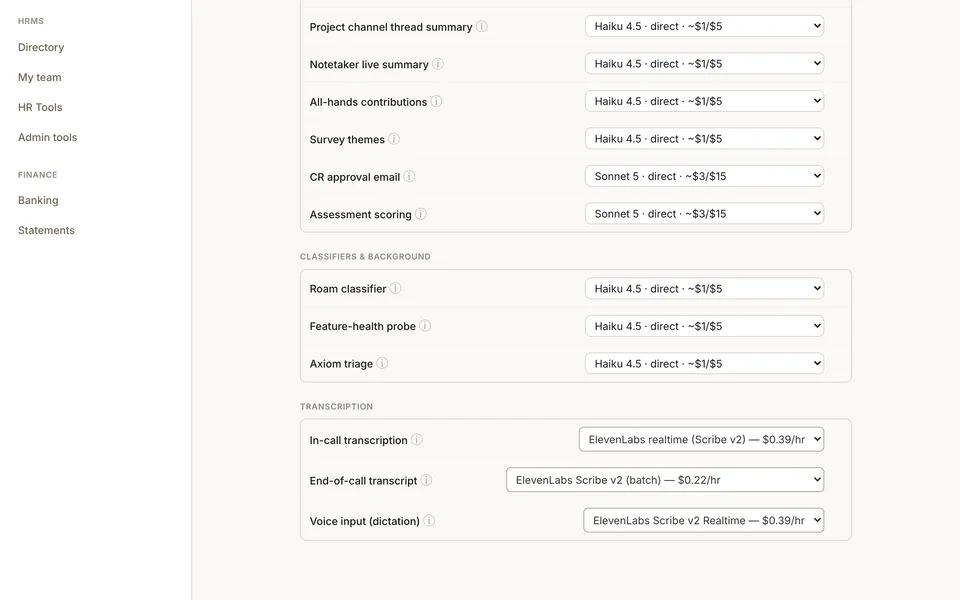
All of this is configured on one screen. Each AI task in the platform picks the model that runs it, and going multimodal added a new class to the list: transcription. Speech to text is three separate picks now, each its own dropdown: the mic you dictate into, the live call as it happens, and the pass over the finished recording. Today we choose between ElevenLabs Scribe v2 and Recall. When a better transcription model comes out, switching to it is a dropdown.
3. The context engine for audio
A transcription model hears sound and guesses words. It has no idea who your customer is. So it gets the important words wrong: customer names, people, and the terms your business runs on. A better model helps, but no model can know what it was never told. This causes a real problem for generating action items post the call, or accurately assigning tasks to people.
The fix is context, and we created a context engine for speech. Before the audio models listen, the platform loads up to 50 words of context picked for the surface you're on. Dictating into a proposal loads that customer's names, contacts and project words. A notetaker call loads the attendees, the account and its recent vocabulary. Ask AI loads the company terms it already knows. The same context hub that lets Ask answer questions now generates the relevant context for speech.
Here is the difference, measured. Two clips, each transcribed by Scribe v2 twice: once from audio alone, once with the context loaded. Same audio, same model, and the only change is the 50 words. Overall word accuracy went from 95.5 to 98.2 percent, which seems like a small difference. But go one level deeper, to the words that matter, the names, products and jargon: those went from 77.8 to 100 percent. The model was already fine on ordinary words.
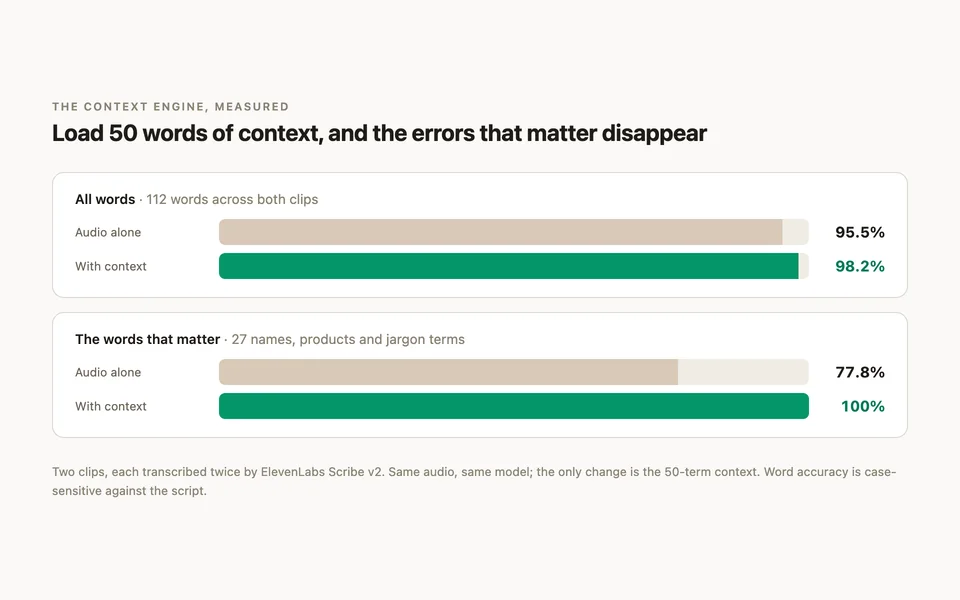
Those few words carry everything that happens after a call: the action items, the task assignments and the follow-ups all key off exactly the names the model used to miss.
Enough with how we did it. Here's practically how teiō is using multimodal today to evolve how we use AI. Everything below runs on teiō play, our demo instance with synthetic data.
1. Ask AI moved into WhatsApp
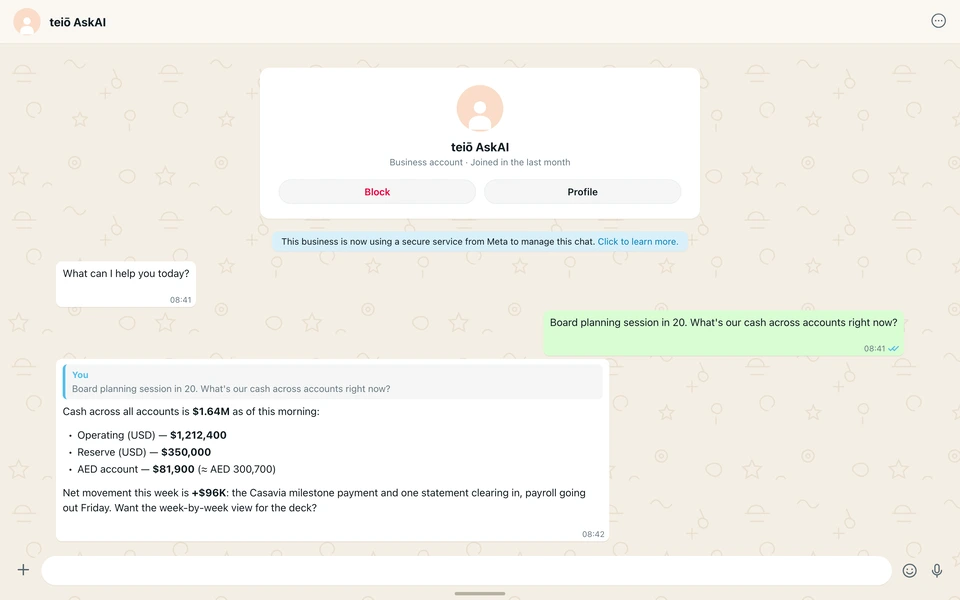
Ask AI inside the platform is great, but you want answers where you already work, and for many of us that place is WhatsApp. So we put Ask AI in WhatsApp natively. The same engine could sit in Slack, Teams or anywhere else just as easily. Enrolled team members text the teiō number like any other contact. Identity is matched on your phone number, so the answers respect exactly what your platform role can see.
This is a real pattern from my week: our CFO and I trading numbers before a planning session, and me pulling the live figures from WhatsApp without opening a laptop. Cash across accounts. MRR and what moved it. Which customers are overdue. And when the conversation lands on a proposal, the reply carries a link that drops me into the live editor with the same thread attached.
2. Building proposals through speech
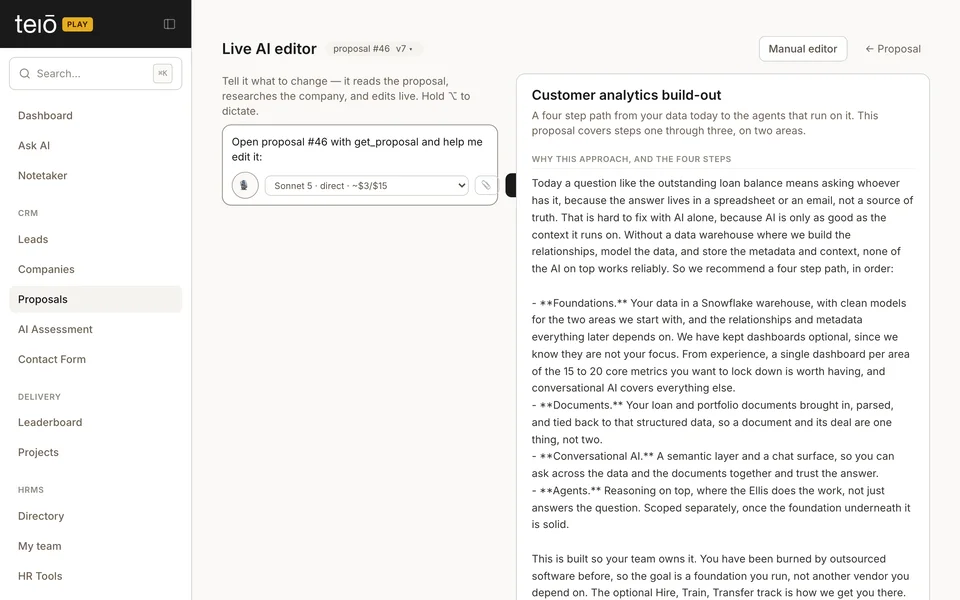
We first started our speech journey with the ability to create and modify proposals through speech. Inside the platform, we've launched live proposal building. It is one screen: the conversation runs on the left, the document renders on the right, and the mic streams speech to a realtime transcription model so words land in the composer as you say them. Ask for changes and the AI answers with suggested edits, shown as changes you accept, reject or tweak one at a time. Nothing lands on the document silently. And the suggested edits all go through the same proposal engine, which understands how we break tasks down, how long they take us historically and how we price them. Every pass snapshots a version, and the history view shows the document as of any point with green and red diffs between versions, so moving fast never means losing track of what changed.
3. Building the proposal during a live call
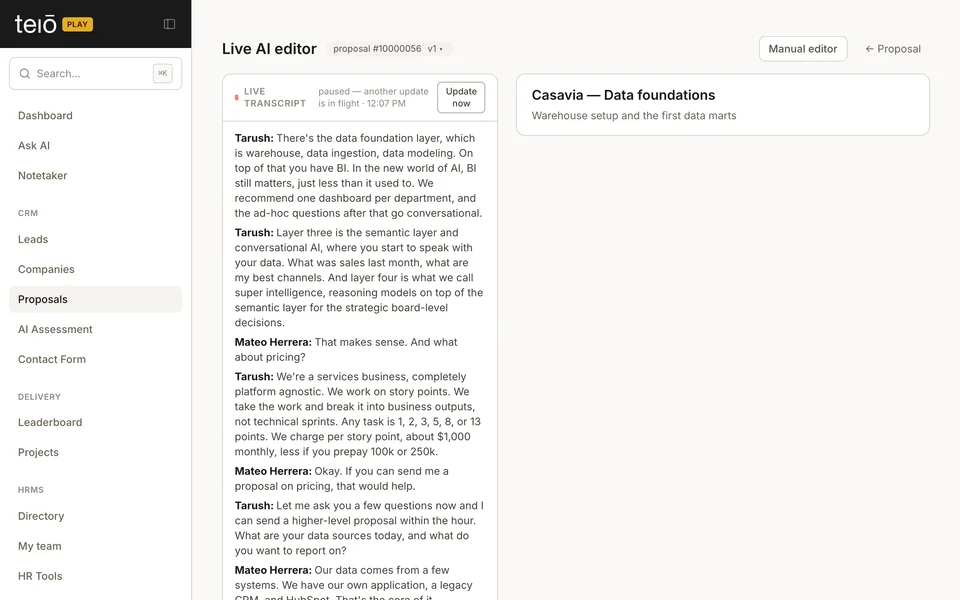
We've since taken this one step further. What we found is we end up speaking about proposals on internal calls, and then someone updates them post the call and sends them back. Instead, through our notetaker, the same live editor now binds to a live call. The transcript streams into the left rail and every stretch of new speech triggers an engine pass. Something said on the call becomes a suggested change on the document within 10 seconds. You can pin rules every pass has to respect, like setting a timeline for a phase or keeping certain topics out of the proposal, and guide the AI into the constraints you need.
On a sales call this changes the shape of the meeting. You share your screen and scope the work with the customer watching the deck take shape. Objections get handled in the document, live, and the proposal is essentially finished before the goodbyes. Internal calls get the same treatment: a planning discussion ends and the document already exists. No need to turn notes into a proposal afterwards, because the proposal becomes the notes.
4. After the call: recommended actions
This one we're building right now. On a customer call last week, the customer said yes to a change request mid call. We had the confirmation, yet someone still had to go click accept in the portal afterwards. When a call ends, the platform can read the transcript, pick out the actions that are operational in nature, and surface each one as a task for a human to approve.
If you want a live demo of any of this, or want to try the play environment yourself, reach out.
Tarush

About the author
Tarush Aggarwal
Tarush runs teiō, building enterprise superintelligence for traditional companies. He started out as the first data engineer at Salesforce in 2011, was a founding expert at the International Institute of Analytics and a columnist for Data Scientist, the first print data magazine, then global head of data at WeWork, and founder and CEO of 5X, voted on G2 as the #1 end-to-end data platform for SMBs.